There's nothing a good sequence diagram can't fix.
Flaky webhooks, a confused new hire, that OAuth flow nobody has touched since 2019. Write the flow in plain text, or build it from live webhooks, HAR files and customer recordings, and every arrow shows what actually went over the wire: exactly what was sent and what came back.
Free forever in the browser. No account, no install, no credit card. Continue where you left off
Make a diagram, fill it with real traffic, then keep and share it.
Every tool makes the same kind of diagram: plain text you can edit, with the request and response on each arrow. The tag on each one says what you need to use it.
Write a diagram
Start from a blank page, a template or a prompt.
- EditorNo accountType the flow as plain text and it draws as you go.
- TemplatesNo account12 real API flows, from Stripe Checkout to OAuth, ready to change.
- AI assistantsNo accountAsk ChatGPT, Claude or Gemini and get back a link to the diagram.
- Coding agentsFree accountAn MCP server, HTTP API and CLI so agents can write and check diagrams.
Capture real traffic
Build the diagram from requests that really happened.
- HAR importNo accountDrop a recording from your browser's Network tab on the editor.
- Webhook inboxesFree accountPoint Stripe, GitHub or any service at a URL and diagram what it sends.
- Recording linksFree accountSend a customer a link and get their recording back as a diagram.
- Drift CheckNo accountRecord the flow again and see which steps changed.
Keep and share
What you make stays editable text you can send anywhere.
- Share links and exportsNo accountA link that carries the whole diagram, or SVG, PNG and Markdown.
- Saved diagramsFree accountA short link and a README embed that updates when you edit.
- CollectionsProGroup related diagrams, like every path through checkout, on one page.
- PresentationsProStep through a flow one call at a time, full screen.
Payloads on every arrow
Answer "what does step 4 send?" without leaving the diagram.
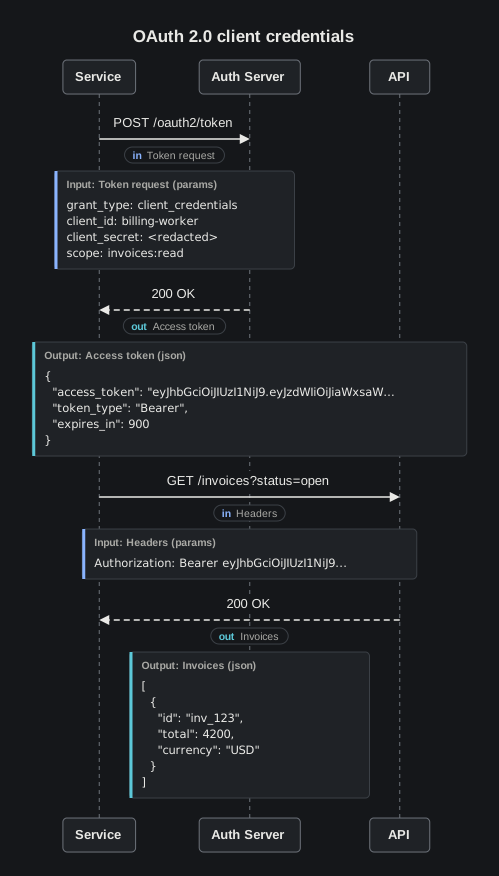
Most sequence diagrams stop at "App calls Auth Server", and the reader goes digging through API docs to find out what was sent. In Volley each arrow carries its input and its output, and the diagram stays readable.
- Write it once. An
in:block for the request, anout:block for the response. JSON, form bodies, query strings, headers or plain text. - Read it on demand. Each payload shows as a small tag. Click the arrow to see every field in a table, or the raw body.
- Replies pair up. A dashed reply links to its request, so selecting
POST /tokenshows the parameters and the token that came back. - Secrets stay examples. Mark a value
<redacted>and it shows as redacted everywhere.
title: Exchange a code for a token

App -> Auth Server: POST /token
in: Token request
  grant_type: authorization_code
  code: SplxlOBeZQQYbYS6WxSbIA
  code_verifier: dBjftJeZ4CVP-mB92K27uhbUJU1p1r_wW1gFWFOEjXk

Auth Server --> App: 200 OK
out: Token response
```json
{ "access_token": "eyJhbGciOi...", "token_type": "Bearer", "expires_in": 3600 }
```
Webhook inboxesFree account
Watch webhooks arrive, then read them as a sequence diagram.
Get a private URL, paste it into Stripe, GitHub, Shopify or any service, and see each delivery land with its headers and body. When you have the events you need, one click draws them.
- Named for you. The sender comes from its user agent and each arrow is labeled with its event type, such as
invoice.paidorpull_request.opened. - In the order they arrived. See which events fire, in what sequence, and what each one carries.
- Secrets stay out. Authorization, cookie and API key headers are redacted before anything is stored.
Free with sign-in: 1 inbox, 25 requests a month.

Recording linksFree account
Ask a customer for a recording. Get back a diagram, not a HAR file.
Stop emailing instructions for the Network tab and reading raw HAR files full of cookies. Send a link, and the customer's recording comes back as a sequence diagram with the failed request marked.
- No account for them. The link walks them through recording in Chrome, Edge, Firefox or Safari.
- Redacted on their machine. Tokens, cookies and passwords are removed in the customer's browser, and they see exactly what will be sent.
- Ready to escalate. Failed calls are flagged, so engineering sees where it broke without opening a HAR viewer.
Free with sign-in: 1 link that keeps 3 recordings.

HAR importNo account
Already have a HAR file? Drop it in.
Record a flow in your browser's Network tab and drop the file on the editor. Each host becomes a lane and each request an arrow with its body attached. Secrets are redacted and the file never leaves your browser.
HAR file to sequence diagram
Free, with no account. Static files are skipped so the diagram shows API calls. How HAR import works
Drift Check
When an API changes, drop a fresh recording on the diagram and update the changed steps in one click. Run the demo

AI assistants and coding agents
Let your AI agent draw the diagram for you.
A diagram is plain text, and errors come back with a line and column, so an agent can write one, check it and fix its own mistakes. Point it at an API or a codebase and ask for the flow.
- Any chat assistant. ChatGPT, Claude or Gemini reads the syntax from
/llms.txtand replies with a link that opens the diagram in the editor. It works without an account. - Remote MCP server. Check, render, verify and save diagrams from Claude Code, Cursor or any MCP client.
- HTTP API.
check,describe,json,svgandverifyendpoints with an API key. - CLI.
volley checkprintsfile:line:colerrors.volley svgrenders in a build step. - WebMCP. Agents in the browser read and edit the open diagram through page tools.
- Agent skill. Sign in and install a Volley skill that teaches the syntax to your agent.
# Give Claude Code, Cursor or any MCP client the Volley tools
claude mcp add --transport http volley https://volley.sh/mcp \
  --header "Authorization: Bearer $VOLLEY_KEY"

# Or call the HTTP API from a script
curl -s https://volley.sh/api/v1/svg \
  -H "Authorization: Bearer $VOLLEY_KEY" \
  --data-binary @checkout.volley > checkout.svg
Use cases
Document any integration where the payload matters.
Or start from one of the 12 templates, which include Stripe Checkout, Sign in with GitHub, JWT refresh tokens, MCP tool calls and S3 uploads.
OAuth and single sign-on
Authorization code, PKCE, client credentials and token refresh, with every parameter and token on the arrow that carries it. OAuth diagram examples
Webhooks and event flows
Show which event fires when, what the provider sends, and what your handler answers, captured from real deliveries. Webhook tester
Payments and checkout
Lay out intents, confirmations, redirects and callbacks between the browser, your server and the payment provider. Stripe Checkout template
Microservices
Map service-to-service calls, retries and error branches so a new engineer can follow one request end to end.
Support and debugging
Collect a customer's recording, see the failed request in the diagram, and send back a link that explains the fix. Recording links
API docs and onboarding
Embed living diagrams in READMEs and wikis, and walk partners through an integration one step at a time.
Free to write. Pro when it becomes your docs.
The editor, share links, HAR import and updating from a recording are free. Pro is for people who keep their integration docs in Volley.
Free
Everything in the editor, plus three diagrams in the cloud.
$0 forever
No account needed for the editor
- Unlimited local diagrams and URL share links
- SVG and PNG export and the Volley CLI
- 3 saved diagrams with short links
- README embeds with a small Volley badge
- Import up to 8 requests from a HAR file
- Update diagrams from a new recording
- 1 webhook inbox that captures 25 requests a month
- 1 recording link that collects 3 customer recordings
- 200 hosted API and MCP calls a month
- Volley agent skill for Claude Code and other agents
Pro
For people who keep integration docs in Volley.
$9 / month
or $90 a year, two months free
- Up to 1,000 saved diagrams
- Version history, 50 versions per diagram, with a visual compare
- Import whole HAR recordings, up to 500 requests
- Presentation mode and step-through links for walkthroughs
- 20 webhook inboxes and 5,000 captured requests a month
- Recording links for support: 50 links, 200 recordings each
- Private diagrams only you can open
- Collections that group related diagrams on one shareable page
- Badge-free README embeds
- 20,000 hosted API and MCP calls a month
Questions people ask first.
Is Volley free, and do I need an account?
The editor is free and needs no account. It runs in your browser and autosaves there, and share links carry the whole diagram in the part of the URL after the #, which browsers never send to a server. Sign in with GitHub or Google when you want short links, README embeds, webhook inboxes or saved diagrams.
What is a payload in a Volley diagram?
It is the data an arrow carries. Put an in: block under a message for what the sender sends and an out: block for what comes back. JSON, form bodies, query parameters, HTTP headers and plain text all work. The diagram stays clean, and a click on the arrow shows every field.
Can I make a sequence diagram from a HAR file?
Yes. Export a HAR file from your browser's Network tab and drop it on the editor. Each host becomes a lane and each request and response an arrow with its body attached. The file is read in your browser, and tokens, cookies, passwords and secret query parameters are redacted before anything becomes part of the diagram. See how HAR import works.
Can Volley capture webhooks?
Yes. Create a webhook inbox, point Stripe, GitHub, Shopify or any other provider at its address, and watch deliveries arrive with their headers and bodies. Pick the ones you want and Volley draws them as a diagram, with the sender named and each arrow labeled with its event type. Free includes 1 inbox and 25 captured requests a month. Pro includes 20 inboxes and 5,000. See how webhook capture works.
How do I get a HAR file from a customer?
Send them a recording link. They open it without an account, follow the steps for their browser and drop the file. Volley turns it into a diagram in their browser with secrets redacted, shows them exactly what will be sent, and you receive a readable diagram with failed requests marked instead of a raw file full of cookies. See how recording links work.
Can AI agents read and write Volley diagrams?
Yes. Any chat assistant can write a diagram from the primer at /llms.txt and give you a link that opens it in the editor. Coding agents get a CLI, a hosted HTTP API, a remote MCP server at /mcp and WebMCP tools inside the page. The parser reports errors with line and column so an agent can fix its own mistakes. Signed-in accounts can also install the agent skill for Claude Code and other agents.
Can I put a Volley diagram in a README?
Yes. Save a diagram and copy its README embed. It is an SVG served from /d/<id>.svg that updates when you edit the diagram. Free embeds carry a small Volley badge; Pro embeds do not.
How do I keep a diagram up to date when the API changes?
Record the flow again and drop the HAR on the diagram. Volley matches every arrow that starts with an HTTP method and a path, compares field names, JSON types and status codes, and marks each step that changed. One click updates it, and your example values stay. It is free in the editor. Read how it works.
Can I cancel Pro?
Any time, from Account, then Manage billing. Pro stays active until the end of the period you paid for. Pro is $9 a month or $90 a year.
Draw your first API flow in the next five minutes.
Open the editor and start typing, start from a template, or drop in a HAR file. There is no account to create and nothing to install.